
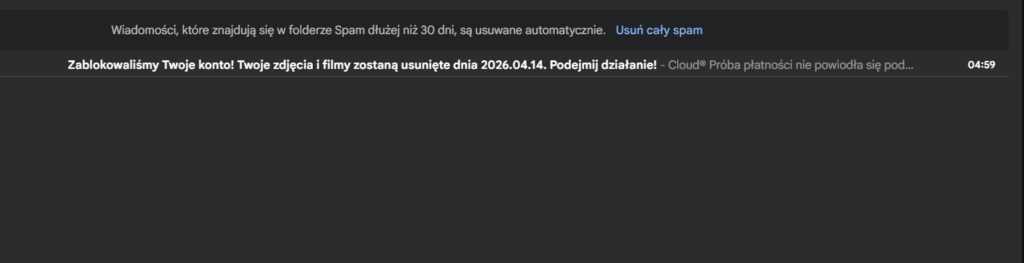
Why are you receiving an email about photos being deleted from Cloud?
Recently, there has been a significant increase in e-mail fraud campaigns that pretend to be notifications about problems with payment for cloud services or lack of available storage. This mechanism is based on classic phishing, also known as “subscription renewal scam”. The messages create pressure by threatening the loss of data – photos, backups or documents – and direct the user to fake websites imitating cloud service portals. Their goal is to trick the victim into making a payment or revealing card details.
In short
The attack takes the form of mass messages, often coming from random-looking domains and repeated even several times a day. The links they contain lead to addresses in the Google Cloud Storage domain (storage.googleapis.com), where there are simple HTML files that function as redirections. Landing pages pretend to be cloud management panels, present false “scanning” results (always indicating lack of space) and tempt with alleged promotions, e.g. high loyalty discounts. At a later stage, the user may be redirected to partner websites offering unrelated services (e.g. VPN or security software), and ultimately to forms that steal payment details.
The basic security rule remains unchanged: do not click on links from e-mails – you should always check your account balance directly in the official application or website of the provider.
What is phishing by e-mail about deleting photos from the Cloud?
Context/history/connections
Technical analysis/campaign details
Although the attack pattern is not technologically new, it remains very effective thanks to the use of social engineering. Fraudsters appeal to users’ real concerns about data loss. Similar warnings have been published by institutions such as the Federal Trade Commission, pointing out that even seemingly credible messages may lead to phishing sites or contain malware.
1) Email layer (distribution and content)
The campaign uses numerous broadcast domains, often appearing to be randomly generated. Message topics are designed to evoke time pressure and fear (e.g. “Payment Declined”, “Account blocked” or information about the date of data deletion). Personalization is also often used – the recipient’s name, email address, account ID or subscription number – which increases the credibility of the message.
2) Link layer: “trusted” first stage
The messages contain links leading to the storage.googleapis.com domain, which contains static HTML files that redirect the user further – to websites controlled by attackers. Using the infrastructure of a large provider increases the chances of bypassing security filters and increases the click rate.
3) Landing page: fake portal and “scan”
The pages the user lands on imitate cloud service interfaces, using familiar visual elements and logos. They inform about alleged problems with backup and threaten to delete data. After clicking the “Continue” button, a fictitious “scan” is launched, which always indicates resource overflow (e.g. Photos, Drive, Mail).
4) Monetization: affiliation and payment fraud
Instead of an actual dashboard, the user goes to partner sites promoting other subscription services and then to payment forms. This is how fraudsters generate profit – both through affiliate programs and directly by obtaining card details.
Practical consequences/risks
The consequences of such an attack can be serious. They include losing money by paying for unnecessary services or unauthorized recurring charges. There is also a risk of card data being stolen (number, CVV, billing data) and their subsequent use in financial fraud. Additionally, if a user uses the same passwords on other sites, provides login credentials, or installs the suggested software, the attack may expand – leading to email account takeover and further compromise of services.